ATS RESUME TEMPLATE
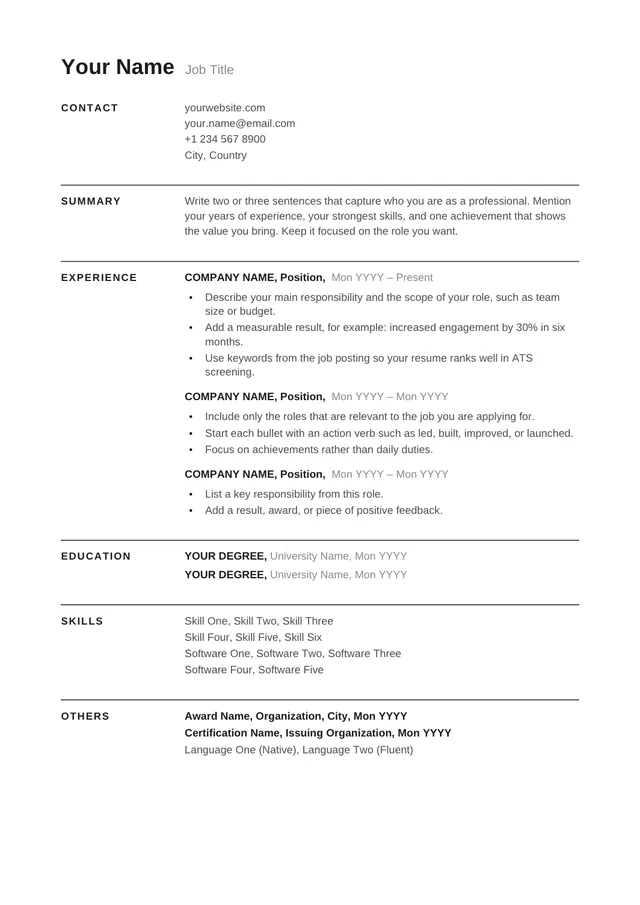
Free Full ATS Minimalist Resume Template
Google DocsMicrosoft WordOne Column
Bare-bones black text with standard ATS sections
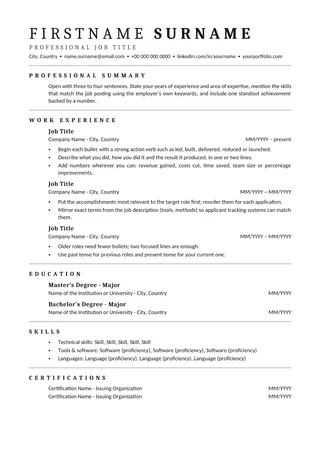
Full ATS Minimalist Resume is one of the plainest layouts in the collection: a single column, black text, and conventional headings with almost no decoration. It is suitable when you want the resume to function as a clean record of experience, qualifications, and skills.
No payment or registration is required to browse the templates. Google Docs may ask you to sign in to create an editable copy.
Template details
- Best for
- Applicants who want zero decoration
- Length
- 1–2 pages
- Design
- No-frills black-and-white layout
- Category
- Minimalist ATS Resume Templates
- Layout
- Single column
- Formats
- Google Docs and Microsoft Word (.docx)
- Price
- Free, no sign-up
USING THIS TEMPLATE
How to customize the Full ATS Minimalist Resume template
Use ordinary text and standard headings throughout. The content—not formatting tricks—should do the persuasive work.
Keep the structure uncomplicated
Start with your name and contact information in regular text, then move into experience, education, and relevant skills. Add a brief summary only if it introduces something the rest of the document does not communicate quickly. The design does not depend on colored rules or sidebars, which makes it easier to check extraction. If you add optional sections, label them clearly and keep the order logical for the role you are applying to.
Use strong wording in place of styling
A black-and-white resume depends heavily on the quality of its bullets. Make the action, context, and outcome understandable in a single sentence where possible. Replace clichés with concrete work. For example, describe the system you supported or the process you improved, along with the result you can substantiate. A clear document gives weak or repetitive claims nowhere to hide, so prune duplicates and prioritise the achievements that match the job requirements.
Avoid reintroducing complexity
It can be tempting to dress up a minimalist template with an infographic, logo, or rating bar after you finish the text. That can create the same extraction problems the design helps you avoid. Use paragraph spacing, bold headings, and normal bullet lists instead of floating text elements. If you need to compare skills, describe actual experience rather than adding visual percentages. Plain formatting can still look professional when it is consistent.
Perform the final checks
Open both the editable document and exported file. Look for missing characters, compressed lines, or strange breaks around headings. Copy the text to a plain editor and confirm the expected sequence, then review spelling and the accuracy of dates. Follow the file-format instructions provided by the employer. No template can guarantee parsing by every system, but a simple structure reduces avoidable formatting surprises.
Similar ATS resume templates to compare
If this layout doesn’t quite fit your experience, these are close alternatives:
- Universal ATS Resume: any role or seniority level (1–2 pages).
- Minimal Black ATS Resume: pure typography with no color or rules (one page).
- Clean ATS Resume: any role; the safest all-round starting point (one page).
Or see the full list of minimalist ATS resume templates.
Final check for this layout
Keep the finished document in normal body text and test a copied plain-text version. Before submitting, check the final file's selectable text and follow the employer's upload instructions. For practical help, use the ATS resume format guide and our ATS resume guide.