ATS RESUME TEMPLATE
Free Clean One-Column ATS Resume Template
Google DocsMicrosoft WordOne Column
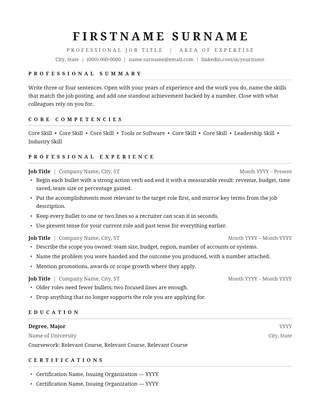
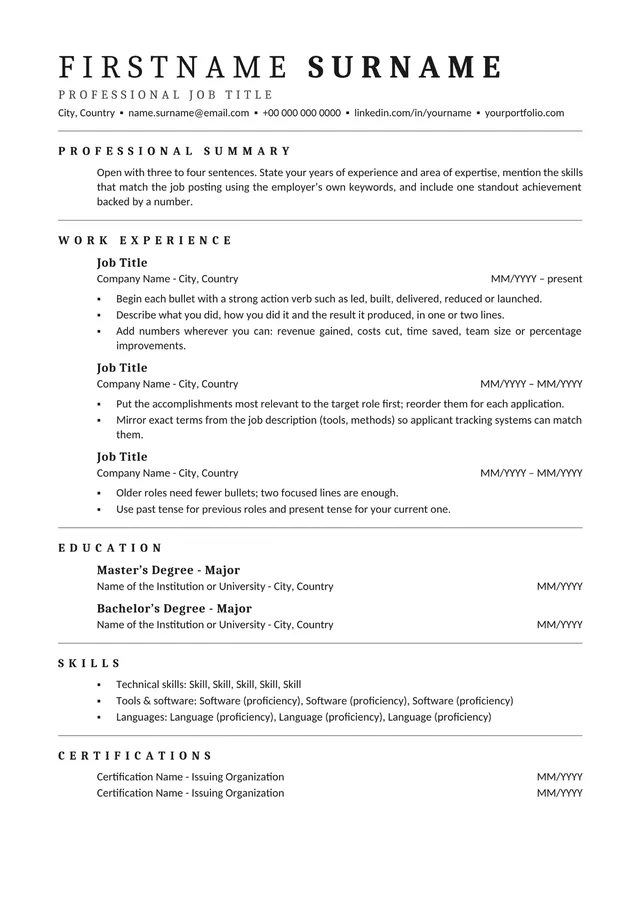
Classic black-and-white layout with serif headings
The Clean One-Column ATS Resume template uses a monochrome page, serif headings, and fine horizontal rules. The contrast creates a traditional appearance without visual clutter. Its generous experience section makes it well suited to applicants who prefer concise job descriptions over icons, sidebars, and decorative timelines.
No payment or registration is required to browse the templates. Google Docs may ask you to sign in to create an editable copy.
Template details
- Best for
- A classic serif look with lots of room for experience
- Length
- One page
- Design
- Black-and-white serif design
- Category
- Classic ATS Resume Templates
- Layout
- Single column
- Formats
- Google Docs and Microsoft Word (.docx)
- Price
- Free, no sign-up
USING THIS TEMPLATE
How to customize the Clean One-Column ATS Resume template
Keep the black-and-white style for clarity; the section titles, dates, and bullet evidence matter more than the decorative lines.
Use the rules as signposts
Thin rules can separate sections visually, but they are not meaningful labels on their own. Keep the heading text above each rule explicit so a reader understands what follows. Avoid replacing a heading with an ornamental symbol. If you copy text from a PDF and the separators produce odd characters, adjust the rule style in the editable document. The safest final document contains the section titles and work details as selectable text regardless of which separators appear.
Handle experience with a steady rhythm
The black-and-white palette leaves room for a clear hierarchy: bold job title, employer and date line, then concise bullets. Repeat that structure across every position. It is worth trimming older roles rather than changing the visual rhythm for one long entry. Show actions and outcomes that matter to your target role. A line about a process improvement is more useful than a long list of routine tasks, especially when a recruiter is scanning multiple applications quickly.
Choose the right length
This format can look polished at one page when the history is short enough. A longer record may need another page, in which case check that section breaks are intentional and there are no isolated headings at the bottom. Do not squeeze margins until the text feels crowded. Read the PDF on a laptop screen as well as a phone: the layout should remain legible even when printed or scaled down.
Test the actual export
The document may look simple and still contain hidden formatting issues after copy-paste between editors. Select all text and paste it into a plain-text file. Confirm that bullets are grouped under the correct employer and dates read in the right order. If a heading is missing from extraction, recreate it as ordinary text. Then tailor your skills and achievements to the job without borrowing qualifications you cannot substantiate.
Similar ATS resume templates to compare
If this layout doesn’t quite fit your experience, these are close alternatives:
- Centered ATS Resume: a traditional look with a centered header (one page).
- Chronological ATS Resume: steady career progression in one field (one page).
- Classic Professional ATS Resume: traditional employers and conservative fields (one page).
Or see the full list of classic ATS resume templates.
Final check for this layout
Avoid placing required keywords only in headers or footers; keep them in the resume body. Before submitting, check the final file's selectable text and follow the employer's upload instructions. For practical help, use the ATS resume format guide and our ATS resume guide.