What is an ATS resume format?
An applicant tracking system (ATS) is software employers use to receive, manage, and review applications. Some systems extract fields from a resume, while others mainly help recruiters organize applicants. There is no single file layout that every product interprets identically. A reliable approach is to use a clear, text-based document in which the most important information has an obvious sequence.
It is useful to separate two ideas: formatting controls whether information can be read, and content relevance controls whether the information answers the job requirements. A beautiful document with missing dates is harder to evaluate; a technically readable document with unrelated qualifications is not necessarily competitive. You need both.
1. Start with a conventional section order
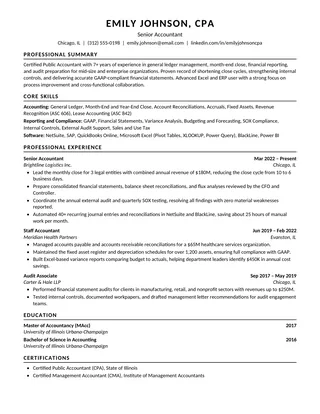
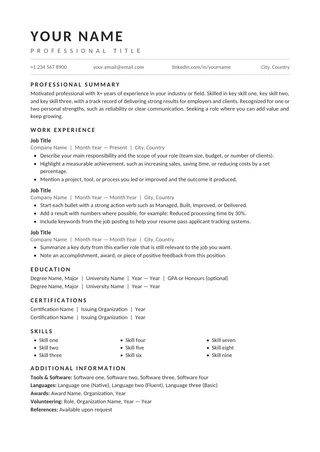
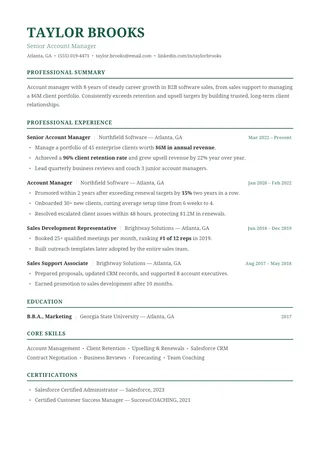
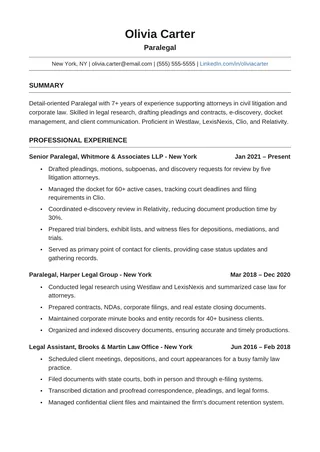
For many applicants, a sensible sequence is contact information, a brief professional summary when useful, work experience, education, and relevant skills. Add projects, certifications, or training when they strengthen your application. You do not need every possible section; blank sections make the document longer without adding evidence.
| Section | What to include | Common mistake |
|---|---|---|
| Contact | Name, usable email, phone, relevant profile links | Icon-only contact information |
| Summary | Specific experience and direction in 2–3 lines | Generic personality claims |
| Experience | Role, employer, dates, outcomes | Unclear timelines or copied duties |
| Education | Credential, school, date when appropriate | Unnecessary personal details |
| Skills | Real, relevant tools and capabilities | Huge keyword lists or rating bars |
Standard ATS resume section headings
Applicant tracking systems map your resume into fields by recognizing familiar section names. Creative labels look distinctive to a person but give software less to work with, so keep the wording conventional.
| Use this heading | Instead of |
|---|---|
| Professional Summary | About Me, My Story, Profile Snapshot |
| Work Experience | Where I've Been, Career Journey, Highlights |
| Education | Academic Background, Learning |
| Skills | Toolbox, What I Bring, Superpowers |
| Certifications | Badges, Credentials Wall |
2. Prefer a clear reading path
A single-column layout is generally the easiest to verify because each block follows the one above it. Two-column resumes can work, but their extraction order depends on the software and the way the document was made. If your resume uses a side area for skills or contact details, test it especially carefully. A design can be ATS-oriented and still require changes for a particular upload system.
Keep headings and experience as editable text, not within graphics. Avoid placing dates in floating shapes simply to align them visually. Where a table is used for layout, check whether the exported text appears row by row in a meaningful order. Decorative dividing lines are usually less important than the positioning of the actual words.
3. Use readable fonts and spacing
Common professional fonts such as Arial, Calibri, Aptos, Cambria, and similar typefaces are generally straightforward to read. Maintain comfortable body text—often around 10.5–12 points depending on the font—and make headings visibly distinct. Consistent margins and line spacing matter more than a specific magic number. If you need to fit another bullet, edit the bullet first before shrinking type or removing all whitespace.
Color is not automatically a parsing problem; important text inside an image is. Moderate color in a rule or heading may be fine, provided the words remain selectable and the contrast is sufficient. Do not encode critical experience using star ratings, pictograms, or charts.
4. Use reverse-chronological work history when appropriate
Listing recent positions first makes the timeline easy to follow. For each role, include a clear job title, employer, and date range, then show relevant accomplishments. Keep date formats consistent, such as “Jan 2024 – Present.” If you held multiple roles in one organization, show the progression rather than blurring distinct promotions into one unexplained period.
Other arrangements can be useful in specialized cases, but they still need unambiguous employers and dates. If you have a gap, use accurate dates rather than changing the format to conceal it. ATS readability and hiring credibility both depend on clear information.
5. Choose DOCX or PDF based on instructions
DOCX: appropriate when the employer requests Word files or when you want to preserve editability. Avoid track-changes markup or hidden comments before uploading. PDF: appropriate when accepted and when the file contains real, selectable text. An image-only PDF may appear fine to you but yield poor text extraction. Never assume one file type works best for every employer or ATS.
After exporting, reopen the file and copy its entire contents into a plain-text editor. Scan whether your name, job titles, organizations, dates, and skills appear in a sensible order. If a column interrupts an experience bullet or a header disappears, repair the source document and export again. This quick test is a practical screen, not a simulation of every ATS platform.
6. Match relevant keywords without stuffing
Read the posting and identify the requirements you genuinely meet. Use the employer's terms when they accurately reflect your experience and are familiar in your field. For a specific tool or qualification, a bullet showing how you used it provides more useful evidence than repeating its name throughout the document. Do not insert invisible keywords or paste the entire job description into metadata.
Keep a reusable master resume for all your experience and prepare a shorter targeted version for each application. This approach is especially useful when a single document would otherwise become too long or unfocused.
7. Make one page or two a content decision
A single page is a useful target when you have a concise history. Two pages can be clearer for people with substantial relevant work. The right length is the shortest version that still demonstrates your qualifications comfortably. A one-page ATS template can help with focus; the two-page minimalist ATS template gives longer career histories additional space.
ATS resume format checklist
- Your name and contact details are real, selectable text.
- Section titles are conventional and unambiguous.
- Job titles, employers, and dates stay together.
- Most recent relevant experience is easy to find.
- Bullets describe accurate outcomes and relevant skills.
- Fonts, spacing, and section treatment remain consistent.
- The final PDF or DOCX matches the employer's requested format.
- Copy-paste into plain text preserves the reading order.
See the Clean ATS Resume for a single reading column, the Professional ATS Resume for restrained styling, or the ATS resume guide for an editing and submission workflow. You can also browse one-page ATS resume templates, minimalist ATS resume templates and classic ATS resume templates.